Guide: How to Launch a Betting Ad Campaign
Launch video and banners 2–3 days before a match to warm up the audience, push notifications the day before, and popunder 2–3 hours before kickoff. Push and popunder run until the match ends. During a league season, keep the warm-up for the season opener and key matches. To see deposits from video and banners in the dashboard, set up post-click and post-view conversion tracking.

A push sent three days before a match is forgotten by kickoff, and a video launched on matchday is already too late. Each format has its own launch time.
Here's the plan. Two to three days before a tournament or a key match, video and banners warm up the audience. The day before the match, push notifications join in and run until the match ends. On matchday, 2–3 hours before kickoff, popunder goes live and keeps running in-play. You don't need to start and stop campaigns by hand: Live targeting does it.
We built this plan for the World Cup. The last section covers what to change for a league season.
What the betting funnel looks like
In simple terms, a user sees a sportsbook ad, goes to a prelander or landing page, signs up and makes a first deposit (FTD). If the offer pays RevShare, redeposits matter too.
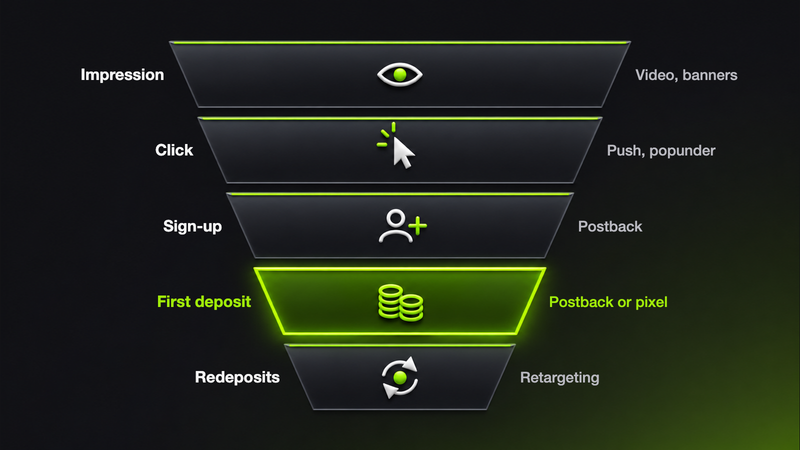
Video and banners warm up the audience while the user hasn't picked a sportsbook yet. Push and popunder bring users to the prelander and landing page. If the offer pays RevShare, players who have already deposited are brought back with retargeting.
Sign-ups and deposits after a click come in via postback. If the user only saw a video or banner and didn't click, the deposit is tracked by a pixel.
Step 1: Pick the matches
Start with the offer's GEOs and the schedule: which matches and tournaments are on this week and which of them are watched in those GEOs. Our sports calendar lists each month's key matches with dates and GEOs. We cover what to do during the international break in a separate article.
Step 2: Decide when to launch each format
Timing is counted from kickoff.
| Format | When to launch | Goal |
|---|---|---|
| Video | 2–3 days before a tournament or key match | Warm up the audience, explain the offer |
| Banners | 2–3 days before a tournament or key match | Reach a wide audience, get the offer across fast |
| Push | The day before the match, runs until it ends | Remind users about the match, drive deposits |
| Popunder | 2–3 hours before kickoff and in-play | Add volume, drive deposits |
Don't compare video and push directly on cost per FTD: some deposits from video and banners show up in the dashboard only as post-view conversions (step 6). For what happens after the click, on the landing page and at sign-up, see our article on the betting funnel.
Step 3: Prepare the creatives
Video
Make short, fast-paced clips that show players' and fans' emotions. The clip warms up the audience and explains the offer. Creative angles: a match announcement with the teams, kickoff time, venue and a call to bet on the match; “what if…” scenarios; fans reacting in front of the screen. Youtarget runs both in-stream and outstream video.

Banners
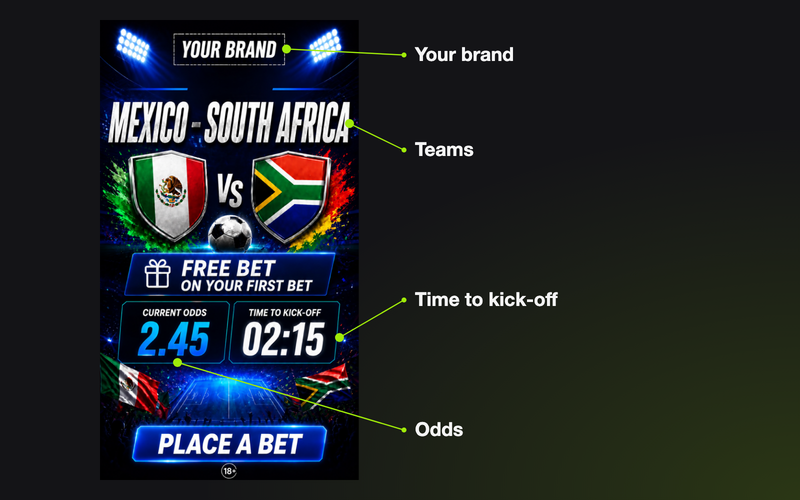
A banner needs a strong offer, a short headline and a CTA that read at a glance. We'll help with HTML5 banners: we'll add your brand, the teams, the odds and a countdown to kickoff.
Push
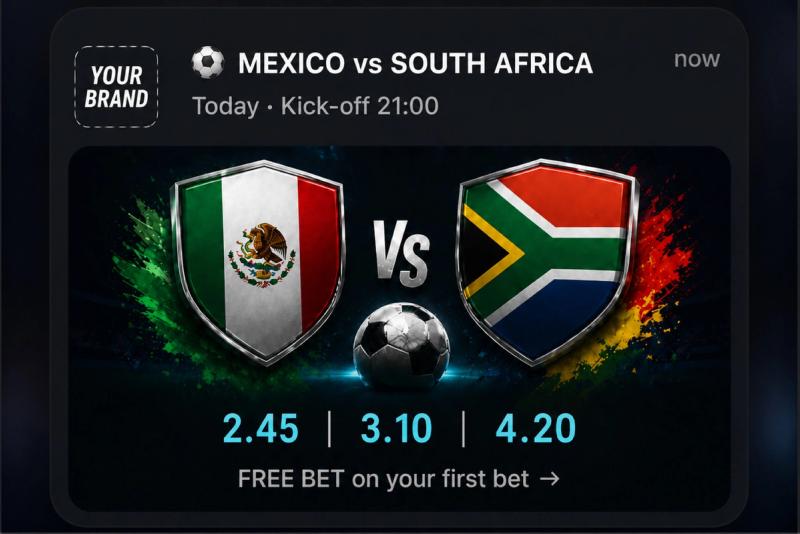
Design the push as a match notification. Angle: a player who is a sportsbook brand ambassador, the national team or club, the country flag, the match name and the kickoff time. In our example, the push title is “Mexico vs South Africa,” with the kickoff time below it and odds for all three outcomes in the image. This creative fits only one match, so it needs a separate campaign (step 5).
Popunder
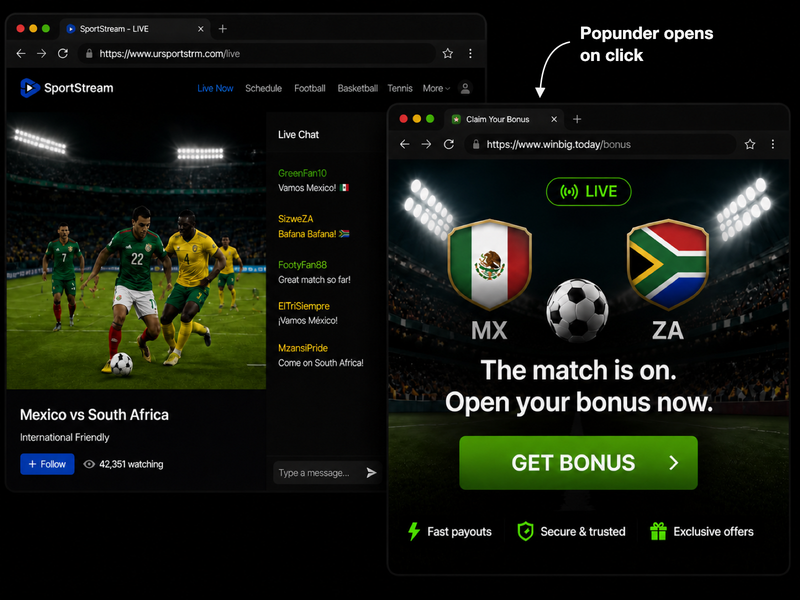
Send traffic to an event prelander or straight to the match betting page. In our example, the prelander is built for a specific match: team flags, a bonus and a single button. Use a prelander like this only in a campaign for that match (step 5). The Youtarget available traffic page shows how many popunder impressions are available per day in each GEO.
Step 4: Set up targeting
The offer sets the GEOs: show ads only where the sportsbook accepts players. Split campaigns by GEO, format and device type, and add other settings once the first data comes in.
- Diaspora. National team matches are watched outside the home country too. Add the GEOs where the team's fans live, if the offer accepts them. Split these users out with browser-language targeting and show them creatives in their native language.
- Device price tier. If the offer has a high minimum deposit, start with mid-range and premium devices. Add budget devices once you see your cost per FTD.
- Proxy. Turn off proxy traffic: a player behind a VPN may not be from the target GEO, and the affiliate program won't pay for that deposit.
- Traffic quality. For an FTD offer, start with high- and medium-quality traffic from direct sources. Add low-quality and resale traffic once the setup pays off.
- Sports sites. For the warm-up, set up a separate campaign on sites in the IAB “Sports” category and keep the main one broad: sports sites have less volume.
- Subscription age. For push, you can set the subscription age in days. To compare fresh and old subscriptions, run them in separate campaigns.
- Placements. If a placement has brought several deposits and its cost per FTD is below the campaign average, use microbidding to raise your per-impression or per-click bid on that placement.
Step 5: Set up Live targeting
Campaign settings have a Live targeting block. The Add event button opens a catalog organized by sport, region or country, league or tournament, and individual match. It lists about 2,600 leagues and tournaments across soccer, basketball, American football, Australian rules football, hockey, baseball, Formula 1, MMA, rugby, volleyball and handball.
For each event, set how many hours before the event the campaign goes live and how long it keeps running after the event ends. The plan from step 2 needs four campaigns, one per format:
- video and banners, two separate campaigns: launch 48–72 hours before kickoff;
- push: launch 24 hours before, run until the match ends;
- popunder: launch 2–3 hours before, run in-play.
Pick the league once, and the campaign will start and stop on its own for every match in that league. A Premier League matchweek of ten matches runs with no manual launches.
In a league-wide campaign, the creative and prelander show for every match, so keep them generic, with no match name. For a key match, set up a separate campaign: pick the match in the catalog and make a creative and prelander with its name and kickoff time.
Step 6: Set up post-click and post-view conversion tracking
Post-click conversions come from users who clicked the creative. Your tracker sends them via S2S postback. In the integration, pick the conversion type: Sign up for registrations, Deposit for deposits.
Post-view conversions come from users who saw the video or banner but didn't click. They are tracked by a pixel: the advertiser creates it in the dashboard and places it on the site where the player makes the deposit.
Without post-view conversion tracking, video and banners look ROI-negative and are often the first to get switched off, taking the warm-up for push and popunder with them.
Step 7: Build audiences
In the dashboard, you can build an audience of users who saw a campaign, clicked it or converted. This plan needs two audiences:
- users who saw the video and banners: run a separate push campaign on them; that's retargeting a warmed-up audience. Don't attach an audience to the main push campaign, or it will only show to warmed-up users;
- users who have already deposited: if the offer pays per FTD, exclude them from push and popunder. If the offer pays RevShare, bring them back with retargeting instead.
Step 8: Set up an auto-rule
An auto-rule stops a creative or campaign if it has spent a set amount without a single deposit. Set it up before launch: once the match is in-play, there's no time to optimize by hand.
Base the threshold on the cost per FTD you're willing to pay. For example, the rule fires if a campaign has spent 1.5–2 times that cost without a single deposit. Deposit postbacks arrive with a delay, so a threshold that is too low will stop a working campaign before the deposits reach the dashboard.
If this is your first campaign in the dashboard, see the step-by-step walkthrough.
Tournament vs league season: what to change
The World Cup lasts about a month, with matches almost every day. A league season has matches every week for many months, so the plan needs two changes.
- Warm-up. If you launch video and banners 2–3 days before every match, they will run nonstop and the creatives will burn out. Keep the warm-up for the season opener and key matches: derbies, playoffs, finals. Run push and popunder for every match in the league.
- Creative angle. Instead of national team flags, use the club, the derby or a player who is a sportsbook ambassador, and write the copy in the GEO's language.
Frequently asked questions
How long before a match should each format launch?
Video and banners 2–3 days before, push the day before, popunder 2–3 hours before kickoff. Push and popunder run until the match ends.
Which formats warm up the audience and which drive deposits?
Video and banners warm up the audience before the match. Push and popunder drive sign-ups and FTDs. Some deposits from video and banners show up only as post-view conversions.
How do I make a campaign start automatically for a match?
Use Live targeting: pick a match, league or tournament and set how many hours before the event the campaign goes live and how long it keeps running after the event ends.
How do I track deposits from video and banners when nobody clicks?
Set up post-view conversion tracking: the advertiser creates a pixel in the dashboard and places it on the site where the player makes the deposit.
Does this plan work for a league season?
Yes, with two adjustments. Keep the video and banner warm-up for the season opener and key matches, and swap national team flags in creatives for the club and derbies.
This article is also available in Russian.